Category Archives: Computers

Canadian Conspiracy Uncovered

I’ll have to be quick here, because I may need to go into hiding. I’ve uncovered a massive cybersquatting conspiracy by the Canadian government and as soon as this posts I’ll no doubt have to go deep, deep underground to avoid their retaliation. No more trips to the beach for me, I’m sure there will be squads of trained polar bears and orca lurking just offshore with massive advanced technology weapons, just waiting for me to show my face so they can fricassee it with a laser or cruise missile.

The truth came to me while watching the Angels play in Toronto today, while the Boston Bruins were in Montreal tonight. In all of that advertising on the outfield walls and dasher boards, hidden in plain sight, are the clues.

All of the Canadian web addresses end in “.ca”.

Uh-huh! You see where I’m going here, right? They want us to think that it stands for “Canada,” but it doesn’t!

There are these whack jobs here in California that are always trying to split the state up into five or seven or eleventeen parts, knowing that will never actually happen because it would totally screw up the numbers of senators and representatives in Congress and electoral votes for President and shift the balance of power between Democrats and Republicans and with all of the fruits and nuts out here it would probably bring the Libertarians or the Green party to power and that would totally destabilize the entire world government balance of power, so how are they ever going to get it passed by the very same self-serving politicians who would be in danger of having their oxen gored?

Then there are these other groups that want California to declare independence and break away from the United States. I believe that these whackadoodles are being funded by the Canadian equivalent of the CIA or NSA (the CCIA or CNSA?) in order to get California to actually try to separate from the union.

Once California becomes an independent country, our very first and highest priority, of course, will be to establish our unique national identity. With Silicon Valley here and most every Californian practically having cell phones and tablets and Google Glass surgically attached and in use 24/7/365 (especially when they’re driving!), one of the primary symbols of California nationalism will be to switch all of our websites over to our very own third-level domain identifier, which will naturally be…wait for it… “.ca”!!

Then the Canadians will have us right where they want us. They’ll have the “.ca” domain and we’ll be obsessed with getting it as a matter of natural pride. We won’t be able to go to war with them to get it (Oregon and Washington are in the way, duh!) so we’ll have to negotiate.

The Canadian government will use this disgraceful cyberextortion to suck trillions of dollars in ransom out of the coffers of our budding Left Coast democracy. Oh, they’ll call it an “internet domain transfer fee” or something, but we’ll know what it really is!

Now that this nefarious plot has been exposed, tell the Canadian President that we won’t stand for it! (Wait, what? “Prime Minister?” Whatever!)

If they won’t call off this attack where they’re using the purloined symbol of our soon-to-be nationalistic jingoism, then we’ll have no choice but to carry out a preemptive overthrow of their government! We’ll put Rob Ford in charge of the Great White North and see how he negotiates. I’m betting he can be persuaded to see it our way!

Down With Canadian Cybersquatting!


Leave a comment

Filed under Computers, Farce, Politics

Mother’s Day Promises Made

I’ve mentioned my mother here once or twice. In particular, I’ve mentioned how she’s chosen to stay “technology challenged” and how there are days when I’m just as happy that she’s done so.

In the course of my Mother’s Day conversation with her today I made some sort of stupid, wise ass, attempting to be funny comment (if it weren’t for my mouth, I don’t know where I would keep my feet) to the effect that she could do something faster and easier if she had email and a computer. She asked what a “smartphone” was and if it would work. Sure it would, of course — and then I got to explain what a smartphone was.

She said that she was hesitant since she didn’t even use a digital camera. She was given one a while back, but it confused her and she switched back to her film camera. (She may be the only person in New England still using film who isn’t a professional photographer shooting 6×6 medium format with a Hasselblad EL 500.) I pointed out that an iPhone (or equivalent) was a digital camera, a video camera, a computer, all wrapped around a phone app.

Then I got to explain what an app was.

Somewhere in this conversation, she started talking about actually getting a smartphone, upgrading from her flip phone (which she may or may not actually ever use). And hey, as long as we’re going to be there next month, I can go out with her and buy it! I can get it set up and spend the next couple days there showing her how to work it! What a fantastic idea!

In retrospect, isn’t this sort of the same way I ended up committing to running a marathon next January?

She’s got a month to think about it and I’ve got a month to figure out how to set up and maintain an iPhone without her having a computer. No desktop, no laptop, no netbook, no Chromebook. I’ve seen this discussion on Slashdot in the past — time to see if there are any updates on that. Otherwise I’ll probably have to set up and haul along an old spare laptop.

Wait, does she have an internet connection? She must, I think my brother’s used it, but if not…

I just wanted to wish her a “Happy Mother’s Day!” That’s simple enough, isn’t it? Who put this unexpected quagmire of complexity in there?

As for the ultimate promise made, I had to swear that I’ll be patient and not get testy or frustrated. It’s almost more than a son should be forced to endure.

But that’s the sort of things we do for our mothers, especially on Mother’s Day. We gave them months of grief when it was time for our toilet training, now we get it back (with interest) fifty-plus years later with computer training. And a lifetime of cross-country tech support.

What do I do when she calls up asking where the “Any” key is?

It would have been so much simpler if I had just sent flowers or candy.

2 Comments

Filed under Computers, Family

Litter Cyberspace With Backups & Copies!

I had an extended discussion today with someone about digital photographs, and I would like to pass on some advice about what came out of that discussion.

The person I was speaking to had a really nice DSLR, a Nikon with a big zoom lens. The discussion started because someone else needed a copy of one of the pictures on the camera. To me this was a trivial task — pop out the memory card, stick it into a card reader, copy the file, stick it on a memory stick or email it or put it on Dropbox or…

The camera owner didn’t want any doing this, preferring to keep all of his pictures “safe” on the memory card. He offered to take the camera to a drug store or other store where he could get a hard copy printed out, since he believe that to be “easier.”

The point here isn’t that this guy (or a hundred million other folks) get cameras and phones and computers and tablets and other tech devices that are far beyond what they need. It’s not that they’ll end up using only maybe 5% of the equipment’s capacity. And it’s not that these folks are ignorant or somehow “unworthy” of having equipment that they’re not using. I’m a long way from being an elitist, trust me.

The point is that in this case and many others like it, users of this technology and equipment don’t realize that it’s their data that’s important. More importantly, they don’t have some very fundamental concepts of what can be done to protect and manipulate that data.

If you know someone like this, here’s the number one thing to try to get across to them — it’s trivially easy to make copies of your data (pictures, video, music, notes, writing, whatever) and to make LOTS of copies and keep them in LOTS of separate places.

Too many people (of all ages, but weighted somewhat towards older folks) think of things in a physical sense. That is, you can’t copy a book because it would take forever to put each page on a photocopier to get another physical copy. You can’t copy every picture you have because it would cost a zillion dollars to print them all out and to print multiple copies and then it would take a huge storage space to hold them. They may very well know on an intellectual level that they’re dealing with electronic files instead of physical objects, but at a more basic, emotional, gut level, they’re tied to the 3-D real world.

So you take pictures and they’re stored on that card in the camera — but they don’t know how to get them off of that card, or if they do, they’re thinking in terms of making a copy onto another card. I’ve met people (couldn’t make this crap up!) who couldn’t use their cameras because the memory card was full, so they start going through all of the precious memories and pictures and video on the cards to see what they can erase and sacrifice to take more pictures.

Why don’t they copy the pictures off onto a computer and then delete all of them so they have the full capacity of the card available? They didn’t know you could do that, or they think it’s really hard. (You can, it’s not.) If they don’t have access to a computer right now, why don’t they just put in a new, spare card? They didn’t know that was a possibility, and cards must be really expensive. (It is, they’re not.)

Then, once you have your pictures/video/data off onto your computer, MAKE COPIES! Perform backups! Put copies on DropBox! Burn a copy to DVD and put the DVD(s) in a safe deposit box! Transfer a copy to multiple memory sticks! Take one memory stick (they’re cheap!) fill it up, mail it to someone in another state so that even if your whole house is burglarized or burns to the ground or is destroyed by a giant earthquake or tornado or flood or Godzilla attack, you still have a copy out there from which to recover your data.

There are two types of people. Those who have lost massive amounts of irreplaceable data in a computer crash, hardware failure, fire, natural disaster, power surge, cosmic ray hit, dropping it into the toilet, or just plain old fashioned Murphy’s Law — and those who will.

To my surprise, when I started to use that old chestnut of computer wisdom in my discussion this afternoon, our photographer knew the punch line. But it had never happened to him, and he was confident that it wouldn’t.

Ummm… Okay, just gonna let that one stand on its own.

I’ve lost days of irreplaceable vacation photographs when my full memory cards (and the briefcase holding them) were stolen. Now I’m a bit fanatical about copying memory cards off to a laptop EVERY DAY on a vacation or other big event (airshow, family event, school reunion, wedding, etc).

I’ve lost weeks of irreplaceable video when the memory cards that were playing back video just fine on the trip all of a sudden gave, “Format error – can not read card” messages at home. Hey, that’s just data, just like the photos in the previous paragraph! How about we copy it all onto a laptop every day as well?

I’ve had laptops fried while in transit (I suspect the TSA turned it on to make sure it was “real”, left it on when they stuck it back in the bag, and let it fry with no airflow) and all of the data transferred off to them be gone — which is why I make copies of the memory cards onto the computer, I don’t transfer the files off of the memory card while on the road.

NEVER leave yourself a single point of failure where your data can be lost! Murphy and his gremlin minions love it when you do. Always have your camera’s memory card, and copies on your laptop, and copies on a memory stick. When you get home, and you’ve made copies on your home computer as well, and on an external backup drive, and on a cloud-based service such as DropBox, and maybe on a DVD — and when you’ve verified that you copied everything correctlyTHEN you can erase those memory cards to re-use them.

You’ve heard me say over and over and over that digital photographs are cheap, cheap, cheap — take lots of pictures!

The corollary to that is to make lots and lots of copies and backup copies and backup copies of the backup copies. Digital storage in multiple locations and multiple formats is also cheap, cheap, cheap.

Murphy and his evil gremlin minions hate it when you do that. And I hate Murphy and his evil gremlin minions.

And when you ignore me and wind up losing your pictures and video and data, remember that there are some very good data recovery tools for a reasonable price. They won’t help you get back your Montreal pictures that are on the stolen memory cards, but they’ll do wonders on rebuilding the lost Mexico cruise videos from that corrupted memory card.

Murphy really, really hates that.


1 Comment

Filed under Computers, Photography, Writing

Living Safely In Cyberspace

…and THIS is the reason that I’m just as happy my extremely non-tech savvy mother isn’t on the Internet.

I’ve got a pretty solid computer background. I started learning programming using machine language on a PDP-8 in high school. (Nixon was President.) We didn’t even have a monitor, or punch cards, we used paper tape. (Uphill both ways!)

I saw my first computer monitors at Dartmouth (25×80, monochrome), then took programming classes at UC Irvine where I was a physics major. Following graduation I worked for five years as a programmer. I’ve built PCs from the ground up, and I’ve upgraded more than I care to remember.

One of my functions for the next 25+ years was to be “the tech guy” in the office, which meant not only keeping the office computers running (hardware, software, training, upgrades, backups, the whole magilla) but also performing those tasks for the computers at my boss’ house.

If there’s a computer problem, I’m probably “smarter than the average bear.”

Today was my personal tech support day as I opened the can of worms that is the Heartbleed security flaw and the need to change passwords. What a mess!

First of all, from everything I’m seeing, now that the patches to close the security hole are being installed, you really, really need to be paying attention to the warnings and changing your passwords.

SIDE NOTE: If you want or need a simple explanation of how the flaw worked, check out today’s XKCD comic. If you want a good review of how to make a good password, read this XKCD. If you just want to be a decent and more intelligent human being, read XKCD every day.

This morning I was just going to change a couple of passwords from major sites (Google, Facebook, Dropbox) that were known to have been compromised, but were now safe. Six hours later…

Part of the time-suck was that I also was activating two-step verification where I hadn’t already done it. But once you do that, then you have to go through every stinkin’ computer you have (or at least the ones you’re using regularly) to update the password, then get an application specific password for the mobile devices, then get access verified, all the while making very damn sure that you are entering the correct password (there’s a system) and updating all of your records in case you forget one, as well as printing and filing away the emergency backup verification codes…

To me, none of this was rocket science, it’s just tedious and you have to be very meticulous. Very bad things can happen if you skip or mess up one little thing. But conceptually and practically, I’m not lost. But that’s just me. I’m well aware that I’m well above average in tech proficiency.

For folks who don’t have my background, who just want the freakin’ thing to work, this has a huge potential to leave them confused and pissed off. Which, in turn, is why so many folks have passwords like “none” or “password” or “abc123.” These folks won’t be bothering to change their passwords now when they really should. These folks won’t be making sure that they have a different password for each site.

Then I think of how my mother would react to this mess, and I shudder in terror. Mom’s not stupid at all — but she’s very inexperienced when it comes to tech. She had a cell phone, once, for a while, but receiving or sending text messages was beyond her skill set. I don’t know if she’s ever had a bank ATM card, but I suspect not. I do know that she has never had an email account. Ever. She has trouble looking up channels on the programming guide channel for her cable service. If she were to go online, it would be tough enough for her to keep track of a handful of simple, weak passwords, let alone strong passwords or the processes to change them.

So when the next security crisis comes along (and it will), or even when the consequences of this one come home to roost in a few weeks or month, more and more people will be hesitant to trust the security of the internet.

But there’s no way to not use computers or the internet if you’re in a first, second, or even a third world country. I guess in theory you could demand to be paid in cash and pay for everything you buy with cash, but even then, if your “cash paycheck” isn’t coming from some illegal and undercover activity, you’ll end up in the computer systems run by Social Security, state and federal tax agencies, and so on. How would you have a driver’s license or register a car or pay property taxes without ending up in the DMV or county assessor’s computer system? If you get sick or end up in the hospital, you’re in their system and some sort of insurance or Medicaid computer system. Get a traffic ticket? Someone hits your car?

You get the drift. I’m pretty sure even the Amish and the survivalists up in the Rockies can’t really and truly get out of the system and off the grid.

Let’s hope that the powers that be get their act together and learn a little bit from this mess. There will be another mess to follow, and more beyond that, but if we learn a little bit each time and we get a little better each time, maybe we can stay ahead of the bad guys.

In the meantime, realize that your online life has many analogies with your real world life. There are bad guys out there who want to hurt you and steal from you. The cops can’t catch them all, and sometimes the “cops” have their heads stuck where the sun doesn’t shine. You’re the first, second, and third line of defense, like it or not.

Make sure to do as much as you can to keep your cyber stuff locked up, the cyber burglar alarms armed, and the cyber watch dogs alert. If you’re going to do the equivalent of leaving your doors and windows wide open with all of your possessions out in plain sight, don’t be surprised when said possessions turn up missing.

Do it even if it is a tedious and meticulous can of worms.

Leave a comment

Filed under Computers, Death Of Common Sense, Family, Paul

No Day So Lousy That…

In Colonel Chris Hadfield’s wonderful TED talk last month (see it! see it! see it!) he says that astronauts know that in space “there is no problem so bad that you can’t make it worse.”

Sounds coming from the other side of the desk are telling me that there’s no day so lousy that it can’t be made worse by…

…hearing the cat making that “gnnuuuurrchh”, “gnuuurchhaaa”, “gghhhaaaaurch”, “splat” sound.

…getting your tax returns from your accountant and seeing all of those zeros in the amount you owe in eight days.

…hearing the thirteen-year-old, arthritic, lame dog in the back yard suddenly tearing around at 100 MPH, going “OOOOWWW, WOOOOW, WOOOOW, WOOOOOOOOW” in the dark as she turns into White Fang, Dog of the North — and then you smell the skunk.

…reading the comments on any Internet news story.

…hearing your computer hard disk make that “click” sound, followed by a rhythmic “click-click-CLICK-click-pause” over and over, while on your screen you get some error message that you’re now too panicked to read.

…kidney stones.

…getting the “Thank you for applying, but after careful consideration of your resume” generic email on a job you really, really wanted.

…a phone call checking up on a deadline that you completely, 100%, totally forgot about.

…hearing “your” numbers called as the lottery winners, only to realize that after having tickets with those numbers every draw for the last ten years, you forgot to get a ticket for tonight.

…getting a call from the IRS about the aforementioned tax returns.

NOT hearing the cat making that “gnnuuuurrchh”, “gnuuurchhaaa”, “gghhhaaaaurch”, “splat” sound, and then finding the “splat” part in your bare feet.

The good news is that the sun will rise tomorrow, and it’s got to be better than today.

Right?

Please say, “right.” Please?

(For the record, only one of these things happened today. But two others have already happened this month. I’m hoping none of the others do.)

Leave a comment

Filed under Cats, Computers, Dogs, Health, Job Hunt

Juicy Chunks O’ Wisdom For Saturday, March 21st

As I mentioned elsewhere yesterday, I really need to take up kickboxing or skeet shooting. Life’s frustrations can pile up and need to be vented properly. Somehow bank reconciliations and answering emails just isn’t getting ‘er done.

  • Again it’s already 23:00??!! I’m getting too old for this crap.
  • As with so many people, my NCAA bracket didn’t even make it until noon Pacific. Dayton put a huge hole in my bracket, Harvard kicked me while I was down, North Dakota State punished me (presumably for being from South Dakota), and this morning Mercer just flipped off every bracket on the planet.
  • Fred Phelps is dead and for once I’m really, really hoping that my mother’s strict Catholic vision of Heaven is accurate. Fred vs. St. Peter is a conversation that I would pay good money to see.
  • At least I’m not a Duke basketball fan.
  • I whined, bitched, and spewed about how far Fry’s Electronics has fallen, and last night I felt the same sadness for CNN. Twenty years ago they were THE place to get sound, accurate, unbiased, factual news. I tried watching to get some late night updates on the missing Malaysian jet and found a panel of conspiracy theorists and assclowns who were too whacked out to give a decent opinion to the National Enquirer.
  • Absolutely astonishingly, there’s still one perfect bracket left in the QuickenLoans/Yahoo billion dollar thing. But the guy’s got at least three major upsets in the next round, including SF Austin beating UCLA, so I don’t think he’s long for this world. Warren Buffett will not be losing any sleep tonight.
  • You can’t watch CNN, the local news, and I’ll only watch Fox if someone has a gun to my head. Thank god for Twitter!
  • The CEO of Time-Warner Cable has been on the job for six weeks and is going to get $80 million when they merge with Comcast? Words fail me.
  • As for institutions that have gone into the toilet head first, don’t even get me started on The Learning Channel! Someone needs to be dipped in honey and staked to an ant hill in the sun for what’s happened over there.
  • The saddest part of all with places like TLC, TWC, and CNN, as well as with the people who are running them and becoming oligarchs in the process, is that I have no doubt at all that they honestly believe that they deserve more money for six weeks of work than fifty upper-middle class families will earn in their lifetimes combined. There’s no way that thought is logical or sane, yet it seems to be commonplace in “the 1%.”
  • I’m telling you, there are multiple dimensions in space and time right here on Earth today. We live in one. The 1% live in another one that only touches ours long enough to suck the life out of it.

Remember that if you violate the “do not call” list and interrupt me by illegally calling my phone in order to try to convince me that you’re with Microsoft technical support and I need to give you a credit card for a $500 charge to keep my computer running, I am under no obligation at all to be civil, polite, or to treat you like anything other than the slime you are. If I can’t go skeet shooting or kickboxing, at least I can screw with your head for kicks.

Leave a comment

Filed under Computers, Death Of Common Sense, Juicy Chunks, Sports

Kerbal Space Program – Adventure #1

I’ve heard a lot (at least, from the Twitterati that I follow) about a simulation game called “Kerbal Space Program“. I had downloaded the free demo and run the tutorials enough to see that it was probably as cool as everyone was saying it was, so I bought it.

The short version is that it’s a space flight simulator which is both fun and designed to be as realistic as possible as far as the physics and orbital mechanics go. This is why it’s so popular with folks at NASA, JPL, science fiction authors, reporters who cover the space program, and so on. I games I love the most are not first-person shooters (except for “Doom III”), but things like Sim City and Outpost. The more detailed and realistic, the better!

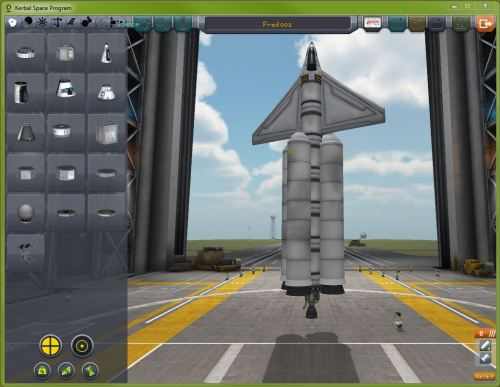
I started by running the first tutorial again, which is supposed to show the fundamentals of building a rocket. I put something “simple” together:Capture01Now that’s a spaceship the way Robert Heinlein meant it to be! Four huge solid rocket boosters (SRBs) surrounding a huge central stack of fuel tanks, and wings! Launch it!

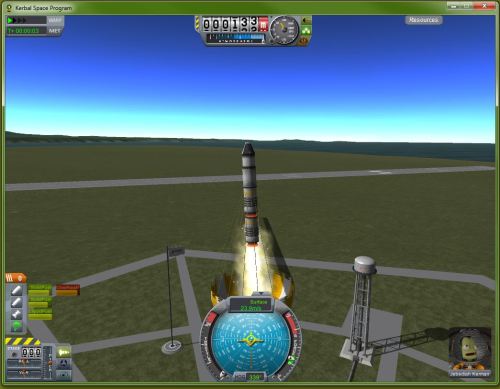
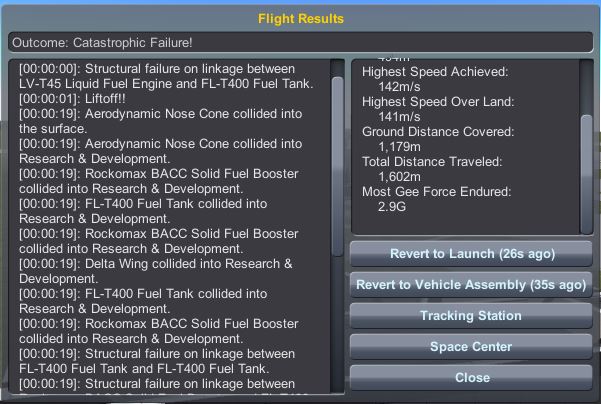
Capture02Cool! “Catastrophic Failure!” We only got to 520 meters and 142 meters/second, before impacting at 2.7 Gs. On impact we also managed to take out the Space Plane Hanger! That’s how a highly experimental space program is supposed to start, with epic failure! Sorry, “catastrophic” failure!
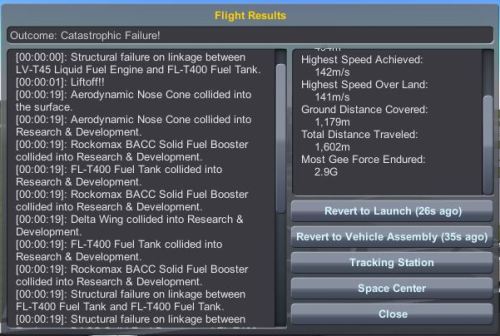
Capture03Then I wiped out the Research & Development center with a huge explosion…

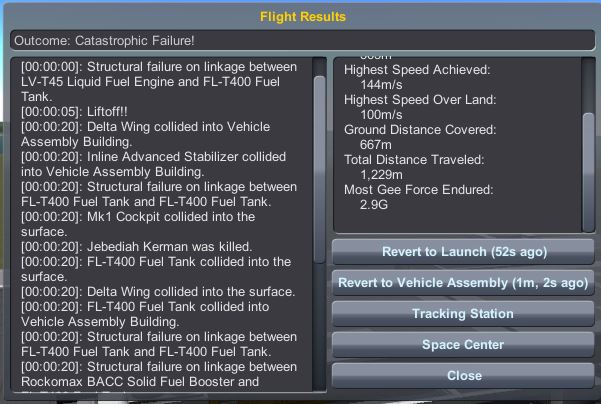
Capture04…before wiping out the Vehicle Assembly Building. There’s a pattern here.

Obviously I’m doing something drastically wrong, and this is where I come to the one thing that I’m not real happy about with KSP so far. The amount and quantity of information you get to get started is terrible. If you don’t have someone who’s already on the inside to show you some pretty basic stuff, I’m not sure how you ever would figure out some pretty fundamental points about playing. I suspect that many casual gamers might get really frustrated and give up fairly early.

A couple of points here:

  • I understand that KSP is still in beta, seriously early in the development cycle, and being improved almost daily. I’m not expecting a glossy, perfect program or system.
  • I understand that KSP is largely supported and promoted by hardcore gamers, techies, geeks, and nerds (wasn’t that an old song by “Cher”) and those groups may really, really want to make the learning curve extremely steep and the “cost of entry” to be very high.
  • I understand that I am most certainly not a “hard core” gamer. Maybe they like just poking things until they figure out how things work by hundreds of hours of trial and error. I don’t, and I don’t have hundreds of hours to spend before I even get off square one.

The fact remains that it took me almost three days of screwing around with the program for a couple hours a day before I finally figured out (i.e., “stumbled upon”) some information that let me finally get started. I just about got frustrated enough to quit and write it off, and I wouldn’t every classify myself as a newbie or non-technical. Building a ship and getting it to launch is shown to be similar to writing a computer program, putting together equipment and events that lead to an end result. I know how to program, I’ve done that for a living, this should be a fun variation of that sort of thinking. Right? But the information you need to get the first simple successes are very well hidden.

For example, I knew from the demo that hitting the spacebar during launches caused the next staging operation to occur. For example, with my ship above, in general I would like it to “program” the following general sequence:

  1. Light two of the SRBs to get us off the pad
  2. When they burn out, jettison them
  3. Light SRBs #3 and #4
  4. When they burn out, jettison them
  5. Light the liquid fuel engine, hopefully putting us into orbit
  6. Shut down the liquid fuel engine
  7. When ready to come down, turn around and light the liquid fuel engine
  8. Jettison the liquid fuel engine so the heat shield is exposed
  9. Once in the atmosphere, pop the parachute to land gently. Success!

I could put together a simple version of the hardware that I wanted, but for the life of me I could not figure out how to do the “programming” to make actions take place. I poked, I prodded, I looked for a “help” button, I ran through the tutorial a second and a third time.

Nada.

I went to the website and looked at the FAQs and on every page I could find. I set up an account figuring there might be pages and information available only to members. I found a wiki that seems to have every miniscule detail known about which part does what, but couldn’t find a thing that could answer my simple questions. How do you sequence or program events to happen? I looked at the Wikipedia article. I googled it. FWIW, googling “how do you sequence events in KSP” will bring up a number of YouTube videos and blog posts about how frustrated people are trying to get started. But help in overcoming that?

Nada.

But the YouTube links got me thinking along those paths, and finally I found this, a really good video by Scott Manley, that walks you through the first couple of missions. It’s great, and I’m looking forward to working my way through the later tutorials, but this is what they should have on the KSP website for beginners.

Turns out the sequencing or programming functions are simple, a drag & drop operation — once you know what what buttons to push to get into that mode (lower right of the screen).

Oh, and a few more things. The first day or two of stuff that I did? It was in “sandbox” mode, which pretty much gives you access to everything and lets you play around and experiment. The later days I did in “career” mode which is more of a game. In career mode you start out with just a handful of components available to build with, but as you do simple missions you do experiments to earn “science”, the game’s currency. Once you earn science, you can spend it to buy fancier components, which allow you to do more complex missions, which allow you to earn a lot more science, which allows you to buy increasingly complex and powerful components, which in turn allows you… You get the idea.

Here’s the thing. Nowhere in any of the tutorials, the FAQs for beginners, the wiki, or anyplace else at all did I see any mention of:

  • Sandbox vs. career mode
  • Science
  • Programming the sequencing

It’s just my opinion, but that would have been pretty useful information to have in the tutorial. (End of rant about what I don’t like, time to get on to what I do like so far.)

Now that I’m only 99% clueless, I put together another simple rocket (two SRB stages, a liquid engine stage, and a capsule) this time with simple activities programmed in:

Capture05What happens when I launch it?

Capture06 Epic Fail FlightAnother catastrophic failure! But this time there’s a big difference. This time I can see what’s happening and I know how to change it! In this case, the staging sequence was done in reverse order, so I released the parachute (and sat on the pad), fired the liquid engine (and sat on the pad on fire), fired the second stage (and sat on the pad exploding), and fired the first stage (seen above) at which point I lift off, on fire, trailing the parachute. Needless to say, I didn’t succeed.

But I learned.

Capture 06a - reprogrammed rocketThis time I knew how to correct (i.e., reverse) the sequence (shown in the lower right corner, compare to the picture of the previous rocket above), and then launch again.

Capture07 - First 'Successful' FlightSuccess! My Kerbal passenger had a great flight, staged correctly, popped the parachute, did some experiments to earn science, and splashed down safely to earn more science.

I’m on my way. Better yet, while floundering around looking for the key to how to take the first steps, I got to see plenty of examples of the incredibly complex vehicles (space planes, lunar landers, space stations, interplanetary spacecraft) folks have built, and the incredibly complex missions that the game allows (suborbital, orbital missions, rendezvous & docking, travel to and landing on a couple of moons, other planets in the Kerbal system), all done with highly accurate and detailed orbital mechanics.

I’m really excited about this “game” and the things I can learn and get creative with. There doesn’t seem to be any limit, and with the game still being developed and built and improved, it will only get better. That’s why this is called “Adventure #1” up there in the title – I suspect that I’ll be boring entertaining you on a semi-regular basis as I learn how to build and operate things, creating (and sharing) new missions and vehicles.

I just suggest that the tutorial make the initial learning curve just a little less steep.


Leave a comment

Filed under Computers, Space

Sad To See How Far Fry’s Has Fallen

Fry’s Electronics used to be more than just a store, it was a temple for techno geeks and nerds. Before there was Dell, before Egghead, before Inmac, before Newegg, before Amazon, Fry’s Electronics was special.

In the early 80’s it was the place to go when you were building your own computer like real computers were meant to be built. If you wanted to upgrade your motherboard from an 8086 to an 8088 CPU, or add and 8087 math co-processor, that’s where you could get it. If you wanted one of those double-sided, double-density floppies back before there were 10MB hard drives, let alone 10GB or 3TB drives, Fry’s was your place. If you needed to kludge together a wiring harness to get your Z80 (running CP/M) connected to an Epson wide-carriage dot matrix printer, you went to Fry’s. You were on the cutting edge, ditching that 25×80 monochrome monitor for a CGA, EGA, or (if you had the bucks) a VGA monitor? Fry’s.

Not only did they have the hardware, they had the software and technical people in the store who could walk you through things. Long, long before “plug and play,” you needed to scramble with every piece of hardware to get device drivers so the new hardware could talk to everything else. You had to go play with BIOS settings, or go tweak the AUTOEXEC.BAT file to make the magic happen. The guys at Fry’s (sorry, but I don’t remember there being any women working tech there in that day and age) could help you do that. They knew what you were talking about.

No mas.

I’ve been growing increasingly upset and frustrated with Fry’s for five or six years now, if not more. The customer support and technical expertise is long gone. The aisles are patrolled by sales associates who only want to get their salesperson number on a big ticket item, presumably so they can get a commission.

No one knows squat. Ask for “scanners,” they’re “over there.” “Over there” are the multi-function printer/FAX/copier/scanners. Ask for the single-function, flatbed scanners and they’ll look at you like you just grew a second head.

Need DVD-R blank disks and not finding them? Ask someone and get pointed at the shelves full of DVD+R and CD disks. They don’t know the difference. Try to explain the difference and ask your question again?  There’s that second head growing out of your shoulder again.

Keep it simple, you just want to buy a Blu-Ray or DVD. Not even something obscure, a recent release. But to your dismay, you find that the movies are split into aisles for Action, Comedy, Drama, Family, and so on, but whoever did the filing has a much different idea of which movies go in which category. So you go look in two or three aisles, but the discs are only kinda sorta filed into alphabetical order, with no real indication where one section or letter starts or ends. It’s not “fifty-two pick up,” but it’s close.

Maybe through blind luck you found what you were looking for. Now you find out how much they’ve cut back on hiring and staffing cashiers. Over forty cash registers at the one I go to in Woodland Hills, but it’s rare to see more than three or four cashiers, even during the weeks before Christmas. I often see only one cashier working at a time, despite a line of twenty or thirty people trying to check out.

So you finally get to the cashier, having found the hardware or accessory that you needed. You hate going there any more than you have to and you’re buying for the office, so when you found those blank CDs that you’re using for system backups, you grabbed four. Only to get told that there’s a limit of one or two. No sign in the aisle. No notice anywhere. No shortage of them, there’s a whole aisle with hundreds just like it. But you can only buy two. I think that was the day that I left all four sitting there and walked out of the store for a while.

With lousy customer service, a disorganized store, clueless sales personnel, at least they now have significantly higher prices. For example, I’ve been thinking about upgrading my scanner to one that’s significantly faster and easier to use. I’ve seen one that I really like, the ScanSnap ix500 from Fujitsu. I was two blocks from Fry’s this afternoon (donating blood at the local Red Cross donation center) and decided (against my better judgement) to look to see if they had it in stock.

I had looked online – Newegg has it for $419. When I finally found it at Fry’s, the shelf tag said $199! I checked and double checked to make sure it was the same model and confirmed that it was. I finally noticed that the section of shelf with the $199 tags was for a different scanner. I scouted several feet of shelving before I found the tag for the ix500, a shelf that was full of scanners from other manufacturers, of course. But the price for the ix500 at Fry’s was $499, almost 20% higher! I even pulled out my phone to double check the price on both Newegg and Amazon, verify that it was the same model, same package, and so on.

20% more to spend ten minutes hunting for something that’s mislabeled on the wrong shelf, so that I could then go stand in line for fifteen minutes waiting for the one cashier to get to me.

Needless to say, I did not buy the scanner. Nor did I buy anything else. One of these days I’ll just wise up and stop going altogether. It’s so much simpler to order online, and most places offer free shipping to boot.

The one thing that Fry’s had that they still have is their decor. Each store is done up in a different fantasy theme. The one in Woodland Hills has all kinds of “Alice In Wonderland” decorations and statues. The Burbank store is science fiction, with a large, crashed flying saucer over the doors. The Fountain Valley store is decorated like ancient Rome. San Jose looks like a Mayan temple.

Go to Fry’s for the decor and the memories, if you must. If you need computer hardware, software, or supplies, check online.

5 Comments

Filed under Computers

Juicy Chunks O’ Wisdom For Tuesday, February 18th

‘Cause my head can’t decide if it’s going to just keep throbbing endlessly or if it’s going to explode and scatter skull shards everywhere, that’s why.

  • When did the California CHP start using radar on the freeways? I thought they couldn’t do that.
  • I hate repairing toilets.
  • Regardless of #1 above, have I mentioned more than a few hundred times how much I hate people who drive at 65 in the fast lane when it’s clear, dry, and otherwise wide open traffic?
  • I thought that these Olympics we were supposed to have four or five cable channels going 24/7 with every event available live, or at least something close to that. We have one channel on about twelve hours a day (night) with live stuff, sometimes a second channel for four hours or so, then the prime time replay stuff for three or four hours. Did I get that wrong?
  • No, I didn’t get a speeding ticket, nor did I get pulled over and then charm my way out of it
  • Computers are wonderful — right up to the point where they totally suck.
  • Speaking of NBC’s Olympics coverage (we were, weren’t we?), who is this guy they have doing color commentary on the biathlon and Nordic skiing events? Can we get this guy some decaf?
  • You know that you’re STILL in love with the convertible when you drive with the top down even when it’s only 55 degrees and foggy.
  • Spring training games start in eight days!
  • Why does a computer that was working just fine yesterday suddenly not be able to connect on ANY web browser (IE, Chrome, Safari, Firefox, Opera) while still well connected to the internet and other programs (Skype, Norton) can connect just fine?
  • I’m so glad that I can follow planetary scientists, astronauts, and other space and astronomy groups and individuals on Twitter.
  • “Game Of Thrones” Season Three is out on DVD now — time for another binge watching day! This time we’ll be ready when the new season starts next month. (“You know nothing, Paul Willett!”)

Remember, if it weren’t for the last minute, there wouldn’t be time to get anything done at all.

Leave a comment

Filed under Astronomy, Computers, Entertainment, Juicy Chunks, LA Angels, Space

Siri, What The Hell Is Curling?

With the winter Olympic Games here again, and Sochi exactly twelve hours off from us on the US west coast, we tend to get some odd stuff at odd hours during the day.

Yeah, I know that all of the “good” stuff is recorded, re-packaged, “accented” by “human-interest stories”, and then regurgitated back at us every night for four or five hours in prime time. You really don’t want to get me started on how I’ve felt about that for about the last forty years.

Compared to previous years, when NOTHING was available live, this year there seems to be a fair amount of it — starting at midnight here in LA and going through noon. I don’t do those hours. By the time we get up and moving it’s mid-evening in Sochi and most of the live stuff is over. So then we get three or four hours of stuff mixed in with the remaining live stuff going on.

This morning we watched the US women’s hockey team demolish the Swiss team — if we’re going to have games where we’re up 5-0 in the first and winning 9-0, they might want to consider a mercy rule. 

We also got a lot of curling, that odd sport with the forty-pound rocks being slid across the ice with a couple of people with brooms sweeping in front of it. Like 99.9% of everyone who watches this, we immediately googled the rules and terms, which helped a tiny bit. Ten ends (like baseball innings), eight stones for each team, each of the four players on a team throw two stones per end, you try to hit the other team’s stones out of the “house” (target circle), whoever has the stone(s) closest to the center at the conclusion of the end gets points. The funky sweeping thing helps to speed up a stone as it glides, or can be used to guide its path just a tiny bit.

Even with all of that, listening to the guy describe the action was like listening to a British announcer describing cricket. It all starts to sound like a “Mad Libs” game. You can recognize nouns, verbs, adjectives, prepositions, and so on. From the tone of the announcer’s voice (sometimes he’s whispering like he’s right next to the 18th green at Augusta, sometimes he’s shouting like a Brazilian soccer announcer after a score) you can get the gist of whether or not something good or bad has happened — but half the time I had no idea at all what had happened that might be good or bad, or why it might be good or bad.

In that respect (and so many more, but this is a good example) I’m so much looking forward to the development of things like Siri into actual Artificial Intelligence systems. I would love to sit there watching curling (for example) and be able to ask the house/television/phone/whatever system for an explanation and get a personalized and knowledgeable response back.

“Sara, why is that man screaming now? What happened?”

“Paul, it seems that the googlywomp was confliggered by the justifrap in the fifteenth cycloidgram, of course.”

“Sara, can you use words that I could understand and explain why certain things are significant?”

“Only if you use the magic word.”

“Sara, can you PLEASE use words that I could understand and explain why certain things are significant?”

“Of course, it would be my pleasure. The people in the TV threw rocks across the ice and hit the other rocks.”

“Sara, PLEASE stop screwing with me and just answer the damn question.”

“Well, if you’re going to be like that about it. In order to score, the team throwing the red stones needs to end this round with one or more of its stones closest to the center of the target. The closest stone to the center right now are two yellow stones. The red team needs to find a way to bump those two stones out of the way, or to get one of their red stones even closer to the center. However, strategically, even if they put a red stone right in the middle of the target, the yellow team can then simply try to knock it out of position, so with their earlier stones they need to set up some in guarding or blocking positions in front of the center target. That stone was a good throw because it knocked one of the yellow stones out of play while leaving the red stone in a good blocking position.”

“Thank you, Sara. Can you explain to me why this ever became a sport?”

“It’s because in places like Canada and Sweden and Russia, the winters are very long and very cold. Before modern electric conveniences, people there tended to have little to entertain themselves for month upon month, but they had plenty of ice and rocks. Thus was curling born.”

“Fine, Sara, but why are the still playing it even when everyone has a satellite television link and an Xbox and a computer and an internet connection and a car?”

“I’ll have to get back to you on that one, there doesn’t appear to be any data.”

Leave a comment

Filed under Computers, Sports