Category Archives: Computers

Old Year’s Resolution

Plenty of time on Saturday for promising that we’ll get to the gym (and this time we really, Really, REALLY mean it!), watch less television, lose weight, blah, blah, blah.

For now, ending this year, here’s something that’s not really a resolution, but an excellent way to spend a half-hour tonight or tomorrow. You’ll thank me all of next year.

Go through your email and spend the time to hit the “unsubscribe” button on all of the daily and weekly crap that builds up in there.

If you’re anything like me, you buy something, blindly accept terms of service, or maybe even have a newsletter or something that you once actually used or found useful. But after buying one or two things, you haven’t bought anything further in months or years. You aren’t going to any of the concerts or plays from that band or that theater, and you don’t really need to know what that ticket broker has coming up every week. That place you donated to once is now bugging you every week (or more). That newsletter that was really good three years ago is now nothing but clickbait.

So now your inbox is filled with this junk and you either ignore it (and let your inbox fill up) or you just delete it en masse every day. It can be a pain to find the unsubscribe button, to deal with the little hassles they put you through to get them to stop, and it’s only a couple minutes a day to just delete them all. Plus, what if you block them and then you need to get something from them later. Unsubscribing = blocking, right?

Nope. You don’t have to block those senders and sites. In fact, you really don’t want to in many cases. You don’t want to block the airline that’s sending you those travel deals every day, because you do travel with them and you’ll need to see your ticket confirmation and updates. You don’t want to block that ticket agency because you will use them in the future and you don’t want your tickets going into your spam bin or junk mail folder.

But that doesn’t mean that you have to put up with their advertising and repeated appeals for donations.

In every one of those unwanted emails there’s an “unsubscribe” link. The good companies let you just hit it and be done. The pain in the ass companies make you jump through some hoops after they take you to their website and try to convince you to stick with them. Either way, use the unsubscribe button, and be vicious when you cull.

A few minutes a day? Yeah, and at 365 days a year that’s thirty or forty hours. Make the time and effort now, finish 2015 strong, and take back those thirty or forty hours.

You’re welcome.

6 Comments

Filed under Computers

Downgrading FaceBook

As many (most?) people do these days, at least in our society, a growing amount of my Internet access goes through my phone. In particular, I have an iPhone 6+. I also have a lot of apps, for a lot of different specific uses.

I try to be organized. Additionally, some of the uses I need apps for are potentially extremely time-critical, i.e., apps relating to piloting a plane. If I need weather information or radio frequencies or data in a crisis or emergency, I don’t have the time to flip through dozens of screens trying to find the app I need.

My “front page” is where all of my “1st tier” apps are, stuff I’m using a couple dozen times a day. The next page is apps that I use pretty often, but not quite as much as those 1st tier apps. Third page is flying/piloting apps. Fourth page is astronomy apps. Fifth is travel apps. Sixth is business apps. Seventh is a whole slew of utility apps, grouped into subdirectories by topic – music, finance, news, sports, reference, and so on. Finally I have a screen with all of the stupid built-in apps that I’ll never, ever use but I can’t delete.

One of the apps that’s been on Page One since Day One is the FaceBook app. I joined FaceBook in January, 2009 and looking back, it was used immediately for getting in contact with friends from high school. We were coming up on our 35th reunion in the summer and FaceBook became a key for connecting long-lost friends and getting out information about the reunion. It was used afterwards for sharing pictures, and used even more in 2014 for the 40th reunion.

Since then there are other groups of friends who I’ve connected with. Classmates from Pepperdine, friends from science fiction conventions, cousins and relatives, and keeping in close touch with my kids when they’ve been scattered all over the planet.

In addition, my personal site here also posts to FaceBook when I publish a new article, and a number of my friends only see this site by finding it on FaceBook.

That’s why FaceBook has been a “1st tier” app.

Today I moved it back to that second page, and if it keeps getting less useable and more annoying, it’s headed toward page seven.

Why?

I used to see ads once a day, maybe twice. Now I see dozens a day.

The ads all have an option that says, basically, “I never want to see an ad from these guys again.” You’ll see ads from other obnoxious and annoying companies, but at least you’ll never see that one again. Except that choice is apparently exactly as useful as the “close door” and “open doors” on an elevator. It’s an idiot button, there to make you feel like you’re doing something when it fact it makes absolutely no difference at all. There are a couple of particularly annoying ads that I’ve seen, and flagged, for four or five days in a row. I expect to see them tomorrow again.

The algorithms that pick the ads are useless. I’ve seen ads for Denver Broncos jerseys day after day after day. Anyone looking at my timeline for more than five seconds will see that I’m a HUGE fan of the Kansas City Chiefs and hate the Broncos with the white-hot fury of a thousand suns.

I do not see posts from people that I’ve flagged as critical, and family. Things my kids post I never see in my timeline, only find them by going to their timelines and hunting for the missing posts.

Meanwhile, there are people I’ve flagged as “acquaintances”, just one small step above unfriending them, yet I see every single thing they post, no matter how little it matters to me.

It’s gotten to the point where I can scan back a day or two in my timeline and not see my own posts!

I used to load FaceBook to stay in contact with my friends and family. Now I load FaceBook to spend the next hour swearing and deleting one useless piece of crap after another.

Why bother?

Out of curiosity, how much revenue does FaceBook earn by having a useless, annoying ad show up in my timeline, to only be deleted a fraction of a second later? I have never, EVER gone to one of those sites or pages or made any kind of purchase. NEVER. So some version of an “official” NFL Pro Apparel Shop paid FaceBook a fraction of a cent to spam me? Over the course of a month, even with more than a dozen obnoxious ads a day, FaceBook makes what, twenty-five or thirty cents?

How about if they offered a paid version with zero ads, controls that actually worked, and a timeline that shows everything from the people I’ve flagged as most important? Maybe $3 a month? I would pay that in a heartbeat IF IT WORKED, and FaceBook could make ten times as much money!

Nope, that wouldn’t make any sense at all, would it?

Instead, with the app on my first page, every time I go there for any other important app, which is about 100 times a day, there’s that little red dot showing a dozen or more new messages. And I’ll know that of those dozen, at least eleven will be deleted on first sight.

Fine, that annoying red dot an sit on page two where I’ll only see it once or twice a day. Or on page seven where I’ll see it every day or so, maybe.

Or on page eight, where I haven’t been in a month.

Good strategy, FaceBook!

4 Comments

Filed under Computers, KC Chiefs

How Do You View This Site?

Out of curiosity, how do you view this site? Not in the sense of, “Is this guy the next Zen master & Enlightenment elf?” but in the sense of, “Email? Website? Phone? Tablet? Desktop?”

I ask in part because a month ago I changed the background graphics for those viewing the site on a desktop with a typical browser, such as Chrome, Firefox, Internet Explorer, and so on. While I originally had a grey-blue background with an old picture of Fifi (the CAF’s B-29) and some of our other planes escorting her into Camarillo in 2013.

That image was sort of dull I finally realized, so I changed it to the current one, a NASA-Hubble photo of Omega Centaur. There are a lot of adjectives that describe it, but “dull’ will never be one.

Yet no one said a word. Not one.

That made me think that most of those of you who view the site routinely and subscribe, probably get each post in your email. That’s the way I get other blogs that I subscribe to, and I know that the email versions are streamlined for that format and leave out a lot of the razzle-dazzle items that the webpage itself has. Meanwhile, folks stumbling onto the site without any background or reference would just see the new background and figure that’s the way it always is.

This theory makes sense, but I figured it wouldn’t hurt to ask. So, how do you view this site?

Email? The website itself? On your phone? A tablet? A desktop? Which browser? Chrome? IE? Firefox?

I’m curious. Feel free to stick something in the comments if you wish to share.

8 Comments

Filed under Astronomy, CAF, Computers

Monday’s Clouds Plus Electronic Hallucinogens

What does one do when one has spent hours and hours today up to my elbows in Photoshop, cleaning up pictures of my niece’s wedding from last month? Especially when yesterday I talked about a neat new HDR phone app and mentioned how it does some of the stuff that Photoshop does, fast and easily, but in the end isn’t nearly as deep or complicated as Photoshop?

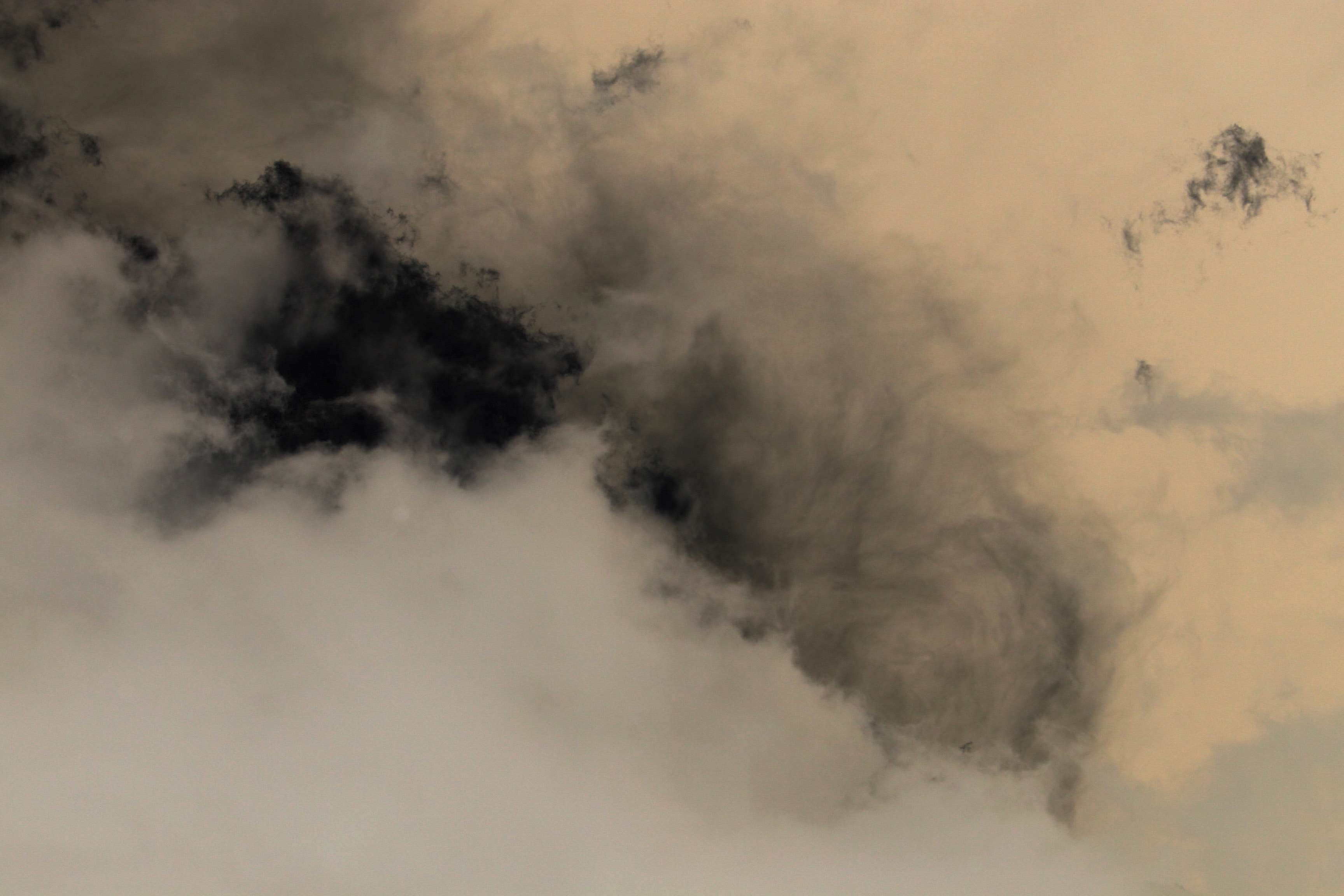
I don’t know who this mythical “one” is, but I go out and look for something to run through Photoshop to see what it can do. In this case, the pictures of clouds that I posted on Tuesday.

Note that I have no training and no real clue what I’m doing, in the sense that I have no plan or idea of what I want the end product to look like. I just take each picture and start fiddling with contrast, color balance, layers, filters, and multiple combinations of all of them until I get something that makes my brain stop and say, “Maybe this doesn’t suck. Next!”

Some took a minute, some took seven or eight minutes, all nine combined took thirty minutes. Some are simple (#2 is just a color flip or inverse) and some are complex (#5 has several layers and a ton of detail generated by the filters). Time to throw it up against the wall and see what sticks!

I think these are in the same order as they were on Tuesday…

IMG_5292 smal photoshopped

IMG_5288 small clean photoshopped

IMG_5291 small clean photoshopped

IMG_5294 small clean photoshopped

IMG_5286 small clean photoshopped

IMG_5295 small clean photoshopped

IMG_5293 small clean photoshopped

IMG_5299 small photoshopped

IMG_5302 small photoshopped

Leave a comment

Filed under Computers, Photography

On The Need For Accurate & Timely Data

With most of us carrying pocket-sized supercomputers (which also happen to have GPS, cameras, and phones built in) we’re all getting good at just popping open an app when we need to know something. Yeah, we all hear cautionary tales from time to time reminding us to take anything on the internet with a grain of salt. But how many of us understand the accuracy and quality of the data being given to us on our dedicated apps?

That became crystal clear today.

There were widely scattered showers in the area, the tail end of something out over the Four Corners area. We never got a drop in our neighborhood. However, a few days ago there were some disastrous mud slides which resulted in key highways still being closed five days later, dozens and hundreds of cars and trucks trapped and destroyed. This may well be a “warning shot” given the record El Niño which is developing in the Pacific Ocean and the region being at the tail end of a historic, four-year drought.

About 16:15 I was out with Jessie. There were some very pretty, threatening clouds overhead, but off to the east, toward downtown Los Angeles, a couple of HUGE thunderheads could be seen.
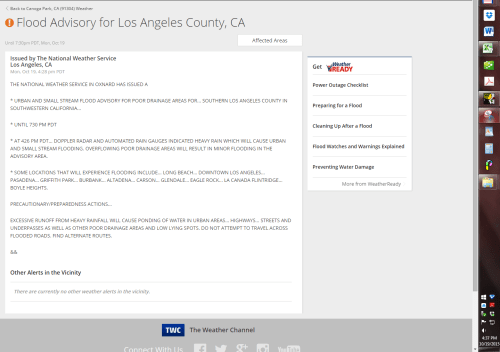
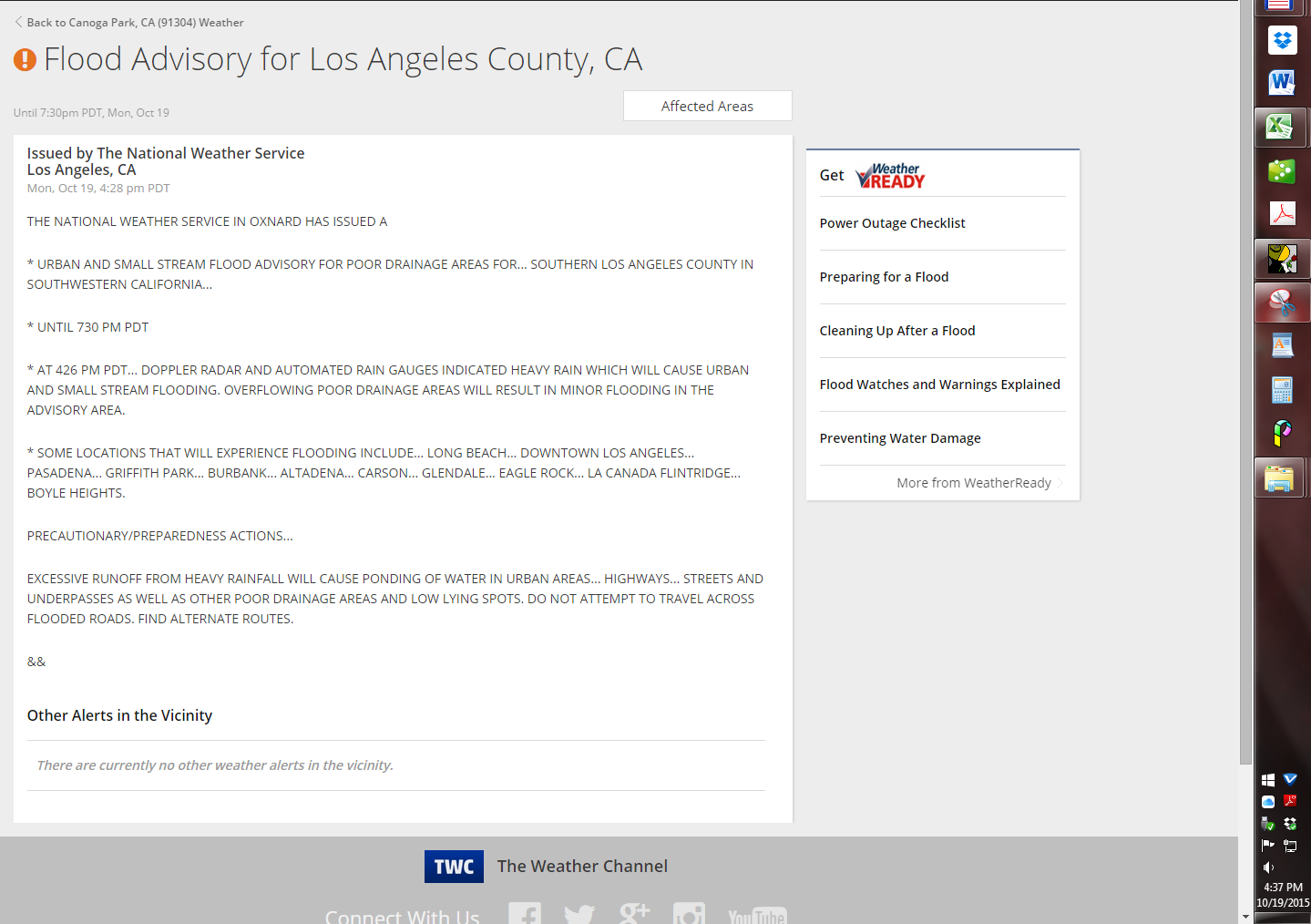
2015-10-19-1628 Flood Advisory

At 16:30, this popped up on The Weather Channel website. Notice the phrasing – “At 426 PM PDT…Doppler radar and automated rain gauges indicated heavy rain which will cause urban and small stream flooding,” and “…locations…include Long Beach, Downtown Los Angeles…Boyle Heights.”

Nothing saying this rain might be coming or that flooding was possible. The rain was happening now, observed on radar and other equipment, and flooding will happen in a specific set of places.

So I hit the icon on that Weather Channel website to look at the local radar and see where those big storms were. Were they moving my way? Should I have cleaned out those gutters yesterday instead of putting it off?
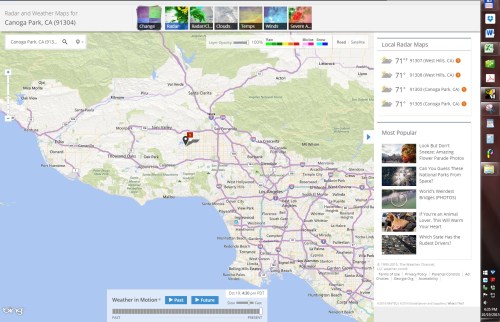
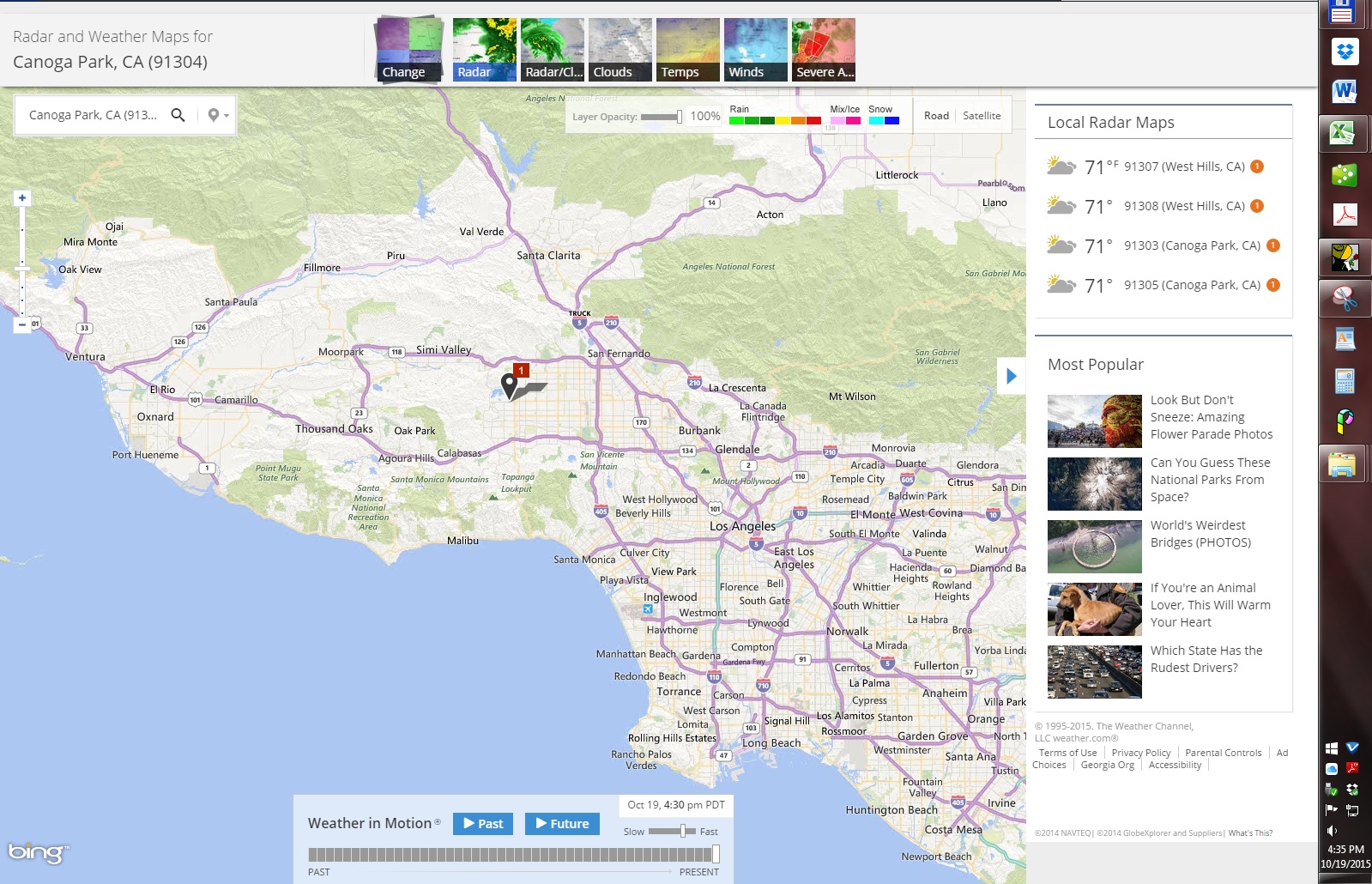
2015-10-19-1630 Weather Channel Website Radar

Wait – this radar picture was supposed to be from 16:28, when the alert at 16:26 said those big storms were over downtown LA and those other cities. Where are those storms on this map? (Yes, I double checked the settings to make sure the radar layer was enabled. Plus, if you zoomed out to see all the way from San Francisco to Albuquerque, you could clearly see storms out over the Colorado River into Arizona and Nevada.)
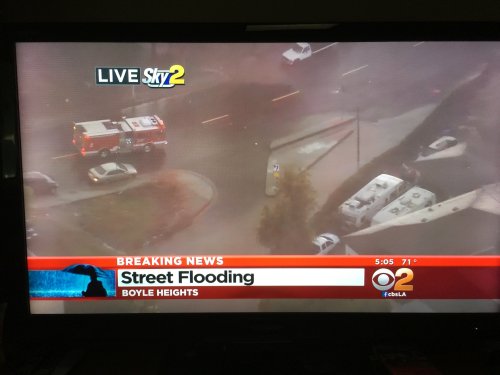
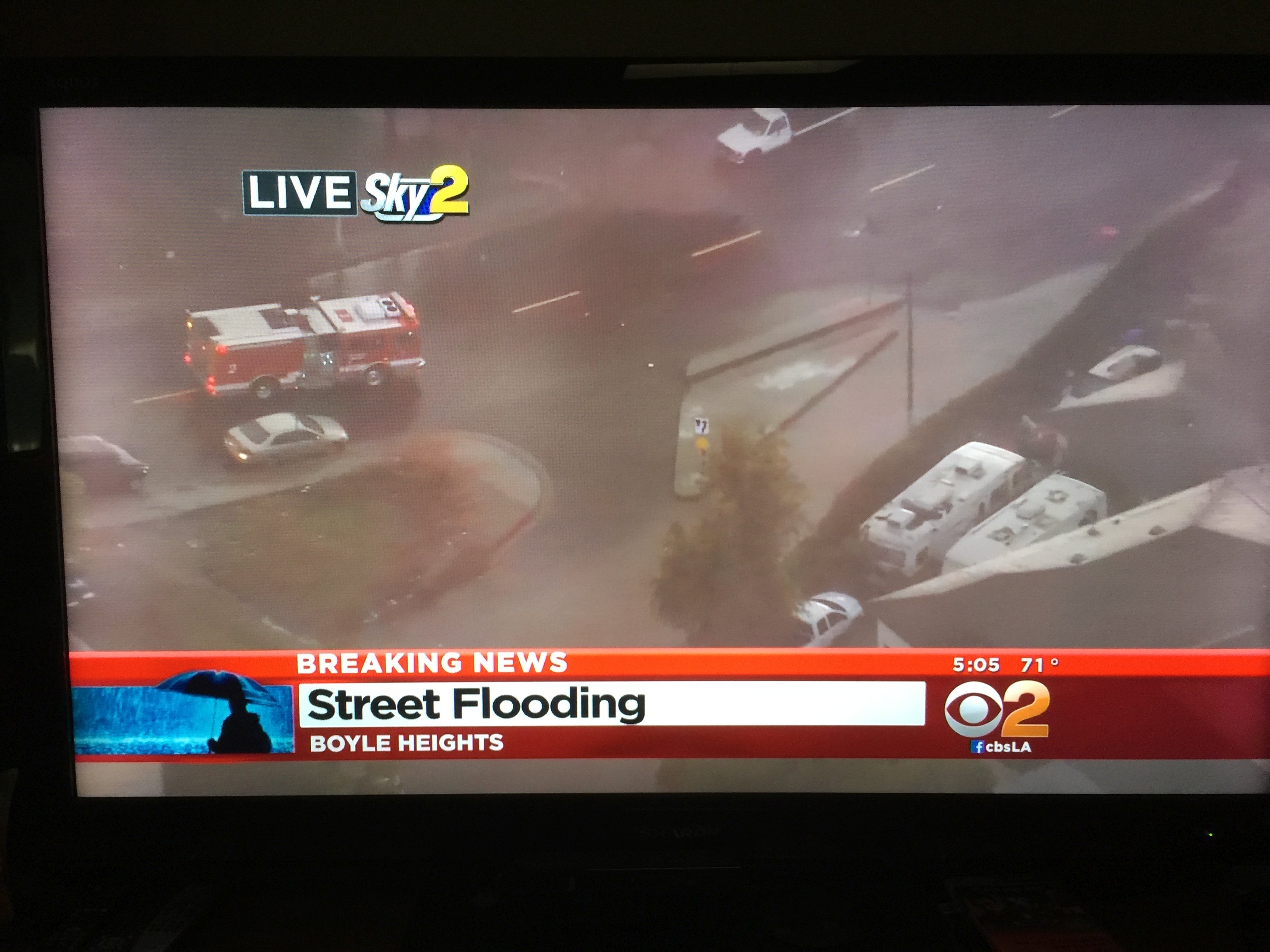
2015-10-19-1705 CBS2 Local Flooding

At 17:00 we turned on the television to watch the baseball game but instead saw this “BREAKING NEWS!” A helicopter over Boyle Heights (remember Boyle Heights? the NWS said there might be urban flooding in Boyle Heights) is showing water a couple of feet deep running through the streets and into yards.

It would sure appear that those big storms really, really were in the area. So why don’t they show up on the radar map that’s supposed to be a key tool for me to use to stay informed and prepared?

Okay, maybe it’s just the Weather Channel website that’s wonky. Let’s check their iPhone app.
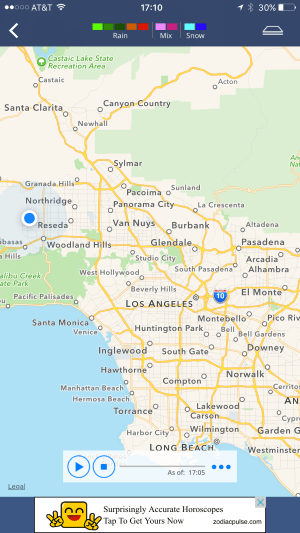
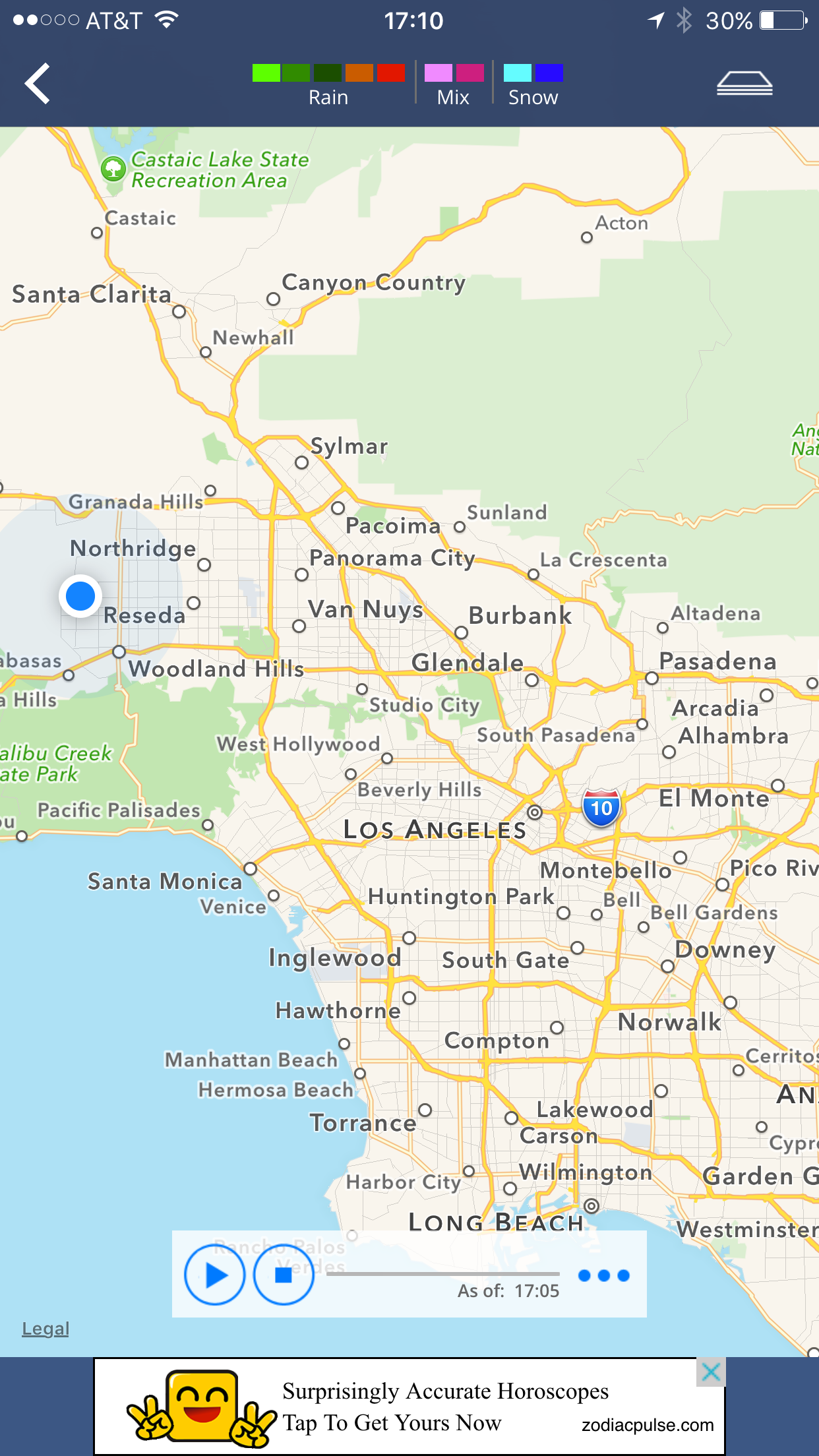
2015-10-19-1705 Weather Channel App Radar

Nope. Not a single drop of rain shown on the radar map for the Weather Channel app, despite the “BREAKING NEWS!” from the Downtown LA area. (Good thing they let me know that I could get “surprisingly accurate horoscopes” through their site. Couldn’t be any worse than the data coming off of their radar maps.)

With the Weather Channel’s data now suspect, let’s look for another source. In a major media market like Los Angeles, every single television station has their own news, weather, traffic, and sports app. Every station will tell you theirs is the best, the most accurate, the fastest with breaking news, and so on. Some stations even have their own Doppler radar setups so they don’t have to rely on the National Weather Service – they would like you to believe this makes them faster, better, and able to give you instantaneous data for your neighborhood, not just the whole region on average. (Honest, the “in your neighborhood” advertising bit is universal here.)
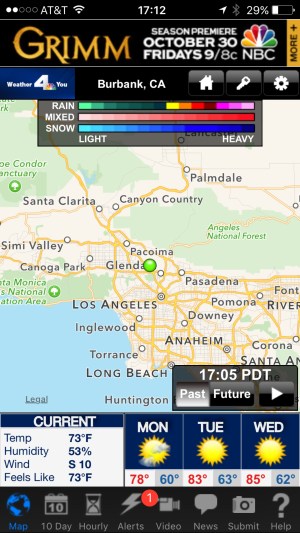
2015-10-19-1705 NBC4 App Radar

Um…not so much. Channel KNBC’s map shows the alert for the flash flood warning, but shows no rain in the area as of 17:05. Good to know about “Grimm” coming back. Maybe some wereduck from the show could talk to the psychic on the Weather Channel’s site and find the missing radar data.
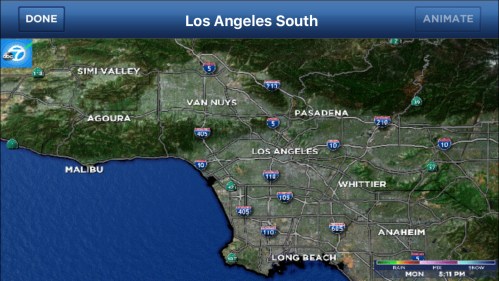
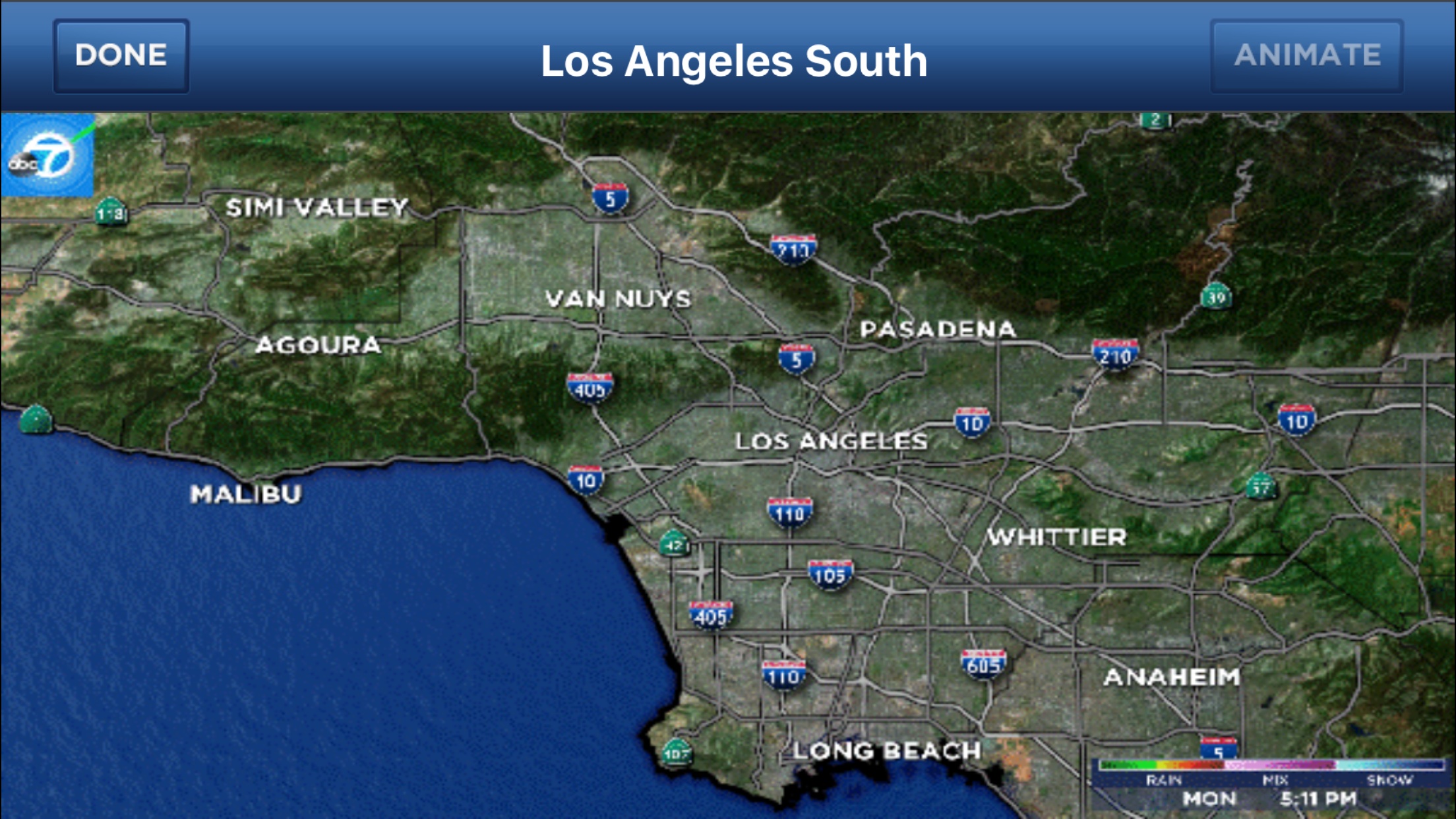
2015-10-19-1711 ABC7 App Radar

Channel 7 KABC’s map also shows nothing as of 17:11. This is “surprising” given their investment in the “MEGA Doppler 7000” system, don’t you think? (This is my “surprised” face!)

Channel 2 KCBS’s has three different apps loaded on my phone, but I couldn’t get any of them to run or load. Not a good sign.
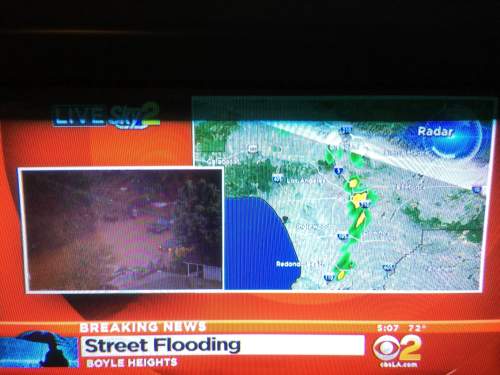
2015-10-19-1707 CBS2 Broadcast Radar

But they’re still covering the “BREAKING NEWS!” in their 17:00 news broadcast. A quick check shows that at least their broadcast radar is showing something more closely related to reality.
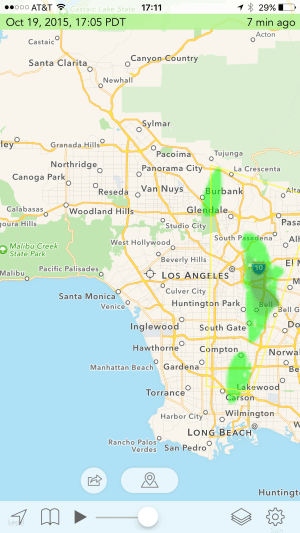
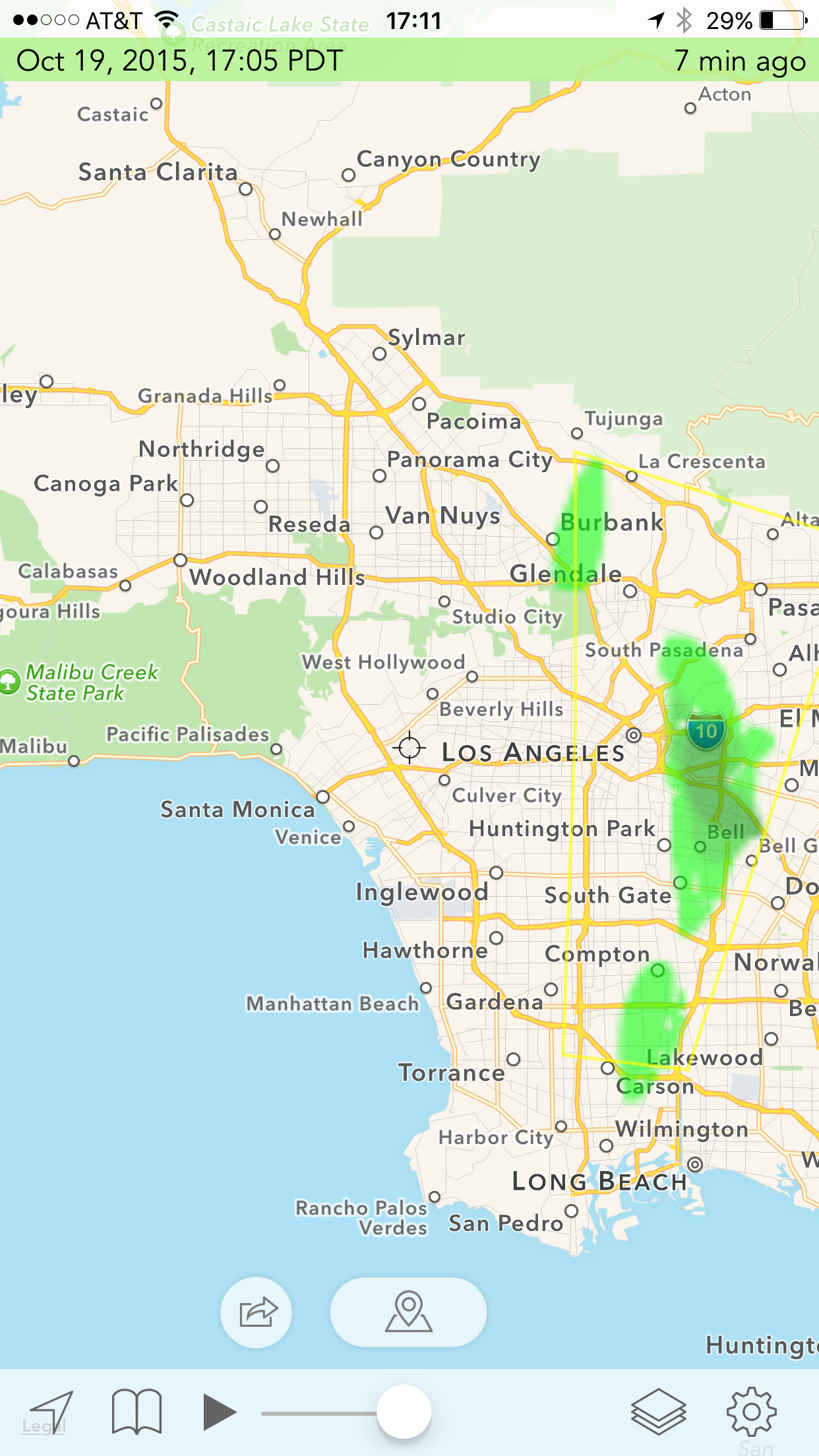
2015-10-19-1705 Aviation Weather App Radar

Being a pilot, I know of other resources that the average person might not be aware of. This is from an app called Hi-Def Radar. The 17:05 radar map here actually shows something that looks like it might be accurate. Good to know if you’re flying!

What if this had been an actual emergency? What if I lived somewhere where those nasty, dark, green blobs weren’t thirty miles away but were instead two miles out and heading straight toward me? The local televisions stations and even the (formerly) legendary Weather Channel might be serving up a lot more marketing hoopla than they are actual cold, hard data.

What about Twitter? It’s not just for following gossip and celebrities, or even space programs, scientists, and authors. I follow a couple of earthquake monitoring bots since they give me almost instantaneous notice of any and all shakers in the area. I also follow the local National Weather Service for days like today.

Oh, my! Look at that! Accurate and timely data, straight from the horses’s mouth (such as it is). I think we have a winner!


Here’s my point – don’t assume that you’re getting accurate and timely data just because it’s coming from an app or website from a big name media-related site!

If you get data though an app, whether it be weather data, driving instructions, turn-by-turn directions, stock and financial data, or anything else, it’s YOUR responsibility to have a good idea about the quality of the data you’re getting. If it’s something where you’re betting your ass on the accuracy of the data, you need to double check your sources in advance so that when you need data instantaneously, you know which sources you can trust and which are less reliable.

I have other examples which I’ll get a chance to document sooner or later, but this is an excellent case study that popped up today. Your mileage may vary, but if you’re in Los Angeles, today’s example shows the weather and radar data on the apps from the Weather Channel and the local television stations are highly questionable. If you want immediate and accurate information about weather hazards (maybe you were one of the hundreds of folks caught in a mudslide last week?) you should be getting your data and radar maps directly from the National Weather Service.

I don’t care if Dallas Rains has a Doppler 7000. His station’s app is useless.

(Yes, there really is a prominent weather guy in LA television named Dallas Rains. Couldn’t make that up.)


 

Leave a comment

Filed under Computers, Los Angeles, Weather

Speaking Of Voice Recognition

Last night I wrote about a recent exchange with Siri. This morning I got a slightly different view of the current Artificial Intelligence (AI) state of the art.

Long time readers may remember that robocallers and spammers are a hot-button item of mine and all deserve a special place in the seventh level of Hell.

The latest version of this are the robocalling spammers who call on my cell phone. It’s bad enough they’re calling there instead of to my home phone. I can (and do) ignore my home phone about 99% of the time if I don’t recognize the Caller ID. But I don’t have that option on my cell phone, particularly since it’s the number I give out to everyone in my job hunt. Even if I don’t recognize the caller, and even if it’s from out of town somewhere, I still need to answer.

Today for the first time I got a voice-recognition robocall. The first response I gave was because I hadn’t realized I wasn’t talking to a human. My second response was more blunt and graphic, but got a robo-response that I didn’t expect.

Robot: “Hello, is this Paul? Are you the head of the household?”

Me: “Yes…”

Robot: “Would you like information on a home mortgage refinance opportunity that could save you hundreds of dollars every month?”

Me: “Would you like to fuck off, eat shit, and die?”

Robot: “I’m sorry, I’ll put you on our do-not-call list. Good bye.”

It’s a mixed blessing. It’s so much less satisfying cussing out a computer, but the end result is so much more productive in the long run. When I cuss out a human, they just hang up and their computer will call me back sooner or later. (Usually sooner.) With this particular AI, someone at least had the courtesy to program the computer to stop future calls, or at least say they will. I suspect it’s for their economic benefit more than to prevent my blood pressure from being raised. It’s obvious they’re never going to get my business, so why bother wasting resources in calling again?

With luck, I’ll never hear from her again. Until the next robocalling slimeball company uses the same program to call about free trips to the Bahamas, or solar energy systems, or credit repair services, or local handyman services, or…

She was no Siri. Or Dora.

Leave a comment

Filed under Computers, Freakin' Idiots!

Siri Vs Paul, October 12th

One of my all-time favorite books is Robert Heinlein’s “Time Enough For Love,” and one of my favorite characters from that novel is Dora, the intelligent, sentient, personalized computer. If you’ve read the book, you’ll know why many of my computers around the house have some version of “Dora” in their name, as in “Desk Dora,” “Laptop Dora,” and so on. The other are named things like “Lapis Lazuli,” “Lorelei Lee,” or “Minerva.”

Heinlein wasn’t the first to think of such a thing, and the idea of a sentient computer to run a ship but also be a companion and friend as opposed to being a machine or a servant is hardly unique to Heinlein. But Dora’s always been my favorite.

We’re a long way from such a level of functionality, of course. On the other hand, we’re starting to see the first inklings of that sort of thing with programs like Siri and Cortana. Speech synthesis has been pretty good for a while. Voice recognition is getting better and is pretty functional in normal use. Image recognition is still waiting for the big breakthrough it needs, but there’s some progress. Search engines, led by Google, are excellent. But when all of these pieces are put together and the machine or program tries to function in the real world, they all (except IBM’s Watson, perhaps) get left in the dust by any bright five-year-old kid.

Thus we find that Siri (I’ll use her only as an example since I haven’t used Cortana yet) can talk to you very well and she can usually understand the words you say to her – but figuring out what you MEAN or want her to help you with is still hit and miss.

I love playing with Siri to see what she can do and what she can’t. I love finding the “easter eggs” that have been programmed in by the Apple software engineers. (Have you asked Siri, “What is zero divided by zero?”) I want it to have access to as much voice-activated, hands-free digital assistance as I can get and if that means that I have to learn how to phrase questions or give commands a certain way, so be it. I’m willing to meet the computer halfway – even while I understand the average person can’t or won’t learn a particular way to interface with the computer. (See “television remote control” for reference.)

I’ve learned to do simple, but useful things. “Siri, please set an alarm for seventeen minutes.” “Siri, please read my email to me.” “Siri, what is 45°C in Fahrenheit?” “Siri, what is the score of today’s Kings’ hockey game?” “Siri, when do the Chiefs play football again and who is their opponent?” These all generate useful answers.

But ask, “Siri, please read today’s baseball scores to me,” and you’ll get a screen full of data, which is correct, but useless if I’m driving.

I’ll often ask Siri a series of questions if I don’t get a useful answer for the first one. At first I’ll be trying to figure out how to ask it “correctly” so that Siri understands what I want and gives me a useful answer. But after a few tries, if we’re getting nowhere fast, I’ll start to let the snark out and ask stupid and occasionally insulting questions just to see how the programming handles it.

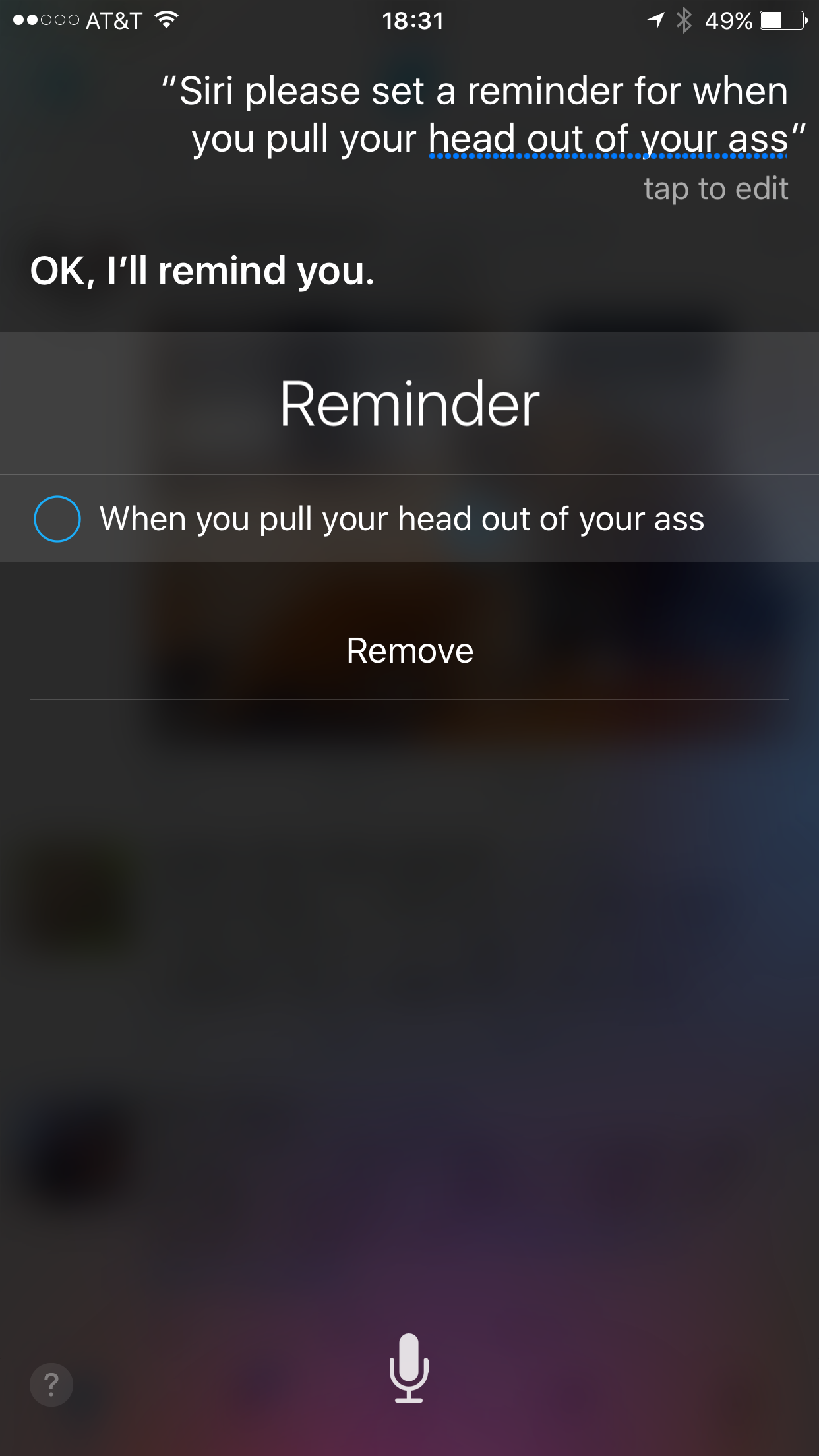
This was happening on Saturday, when I asked the following and got a hilarious (but perfectly accurate and logical) response from Siri:

File Oct 12, 20 06 16

The most hilarious part of all is that somewhere hidden deep inside my calendar lurks that reminder. I’m sure Siri will pick the most inopportune time (such as the middle of a job interview) to pipe up and either tell me it’s time to do that, or to inquire whether or not I have completed the task yet.

One taunts our digital “assistants” at one’s own risk.

Leave a comment

Filed under Computers

Hats Off To The Dropbox Marketing Team!

Dropbox is a wonderful service that not only provides “cloud” based computer storage, but does so in a way that I like a lot. I’m a bit distrusting of letting other folks take 100% control of my data and its backup and storage and accessibility. There have already been a couple of cloud-based places that either went out of business for financial reasons, had legal issues which resulted in their servers being shut down, or had some massive technical screw up that lost data. Either way, everyone who had their data on those servers lost that data, and if that was the only place they had that data (i.e., no offsite backup, such as on a memory stick, external hard drive, or their home or office computer), they were simply screwed.

Dropbox works by keeping your data on its cloud-based servers, but also keeping a copy on every computer that you have linked to your account. So, in my case, when I have my Dropbox account linked to two desktop systems and four laptops, all six of those computers have identical copies of those files. Those files which in turn are identical to the online files that I can access anywhere, any time, from my iPhone, iPad, or any computer on the planet with a web browser and an internet connection using the Dropbox.com website.

If I change a file or add a new file or make any changes at all, within a minute or so (huge files can take a couple of minutes to sync across all devices) all of those computer have the updated version.

If Dropbox goes off line or out of business or has a flood and a hurricane and an earthquake and lightning and a comet strike that wipes out their servers, I don’t lose a thing because I’ve got copies of everything on every one of those linked computers. Plus, of course, copies in those backups I’m doing regularly at my home or office. Right?

Great idea, and it works well. Since I signed up a couple of years ago I’ve gotten to the point where about 90% of the files I use day in and day out are on my Dropbox account. About the only things that routinely aren’t on Dropbox are my music library and my photos library. Those libraries have a ton of files and take up terabytes of space. But if I’m working on some much smaller subset of those files, I’ll keep the working files on Dropbox.

Now, for free Dropbox will give you 2GB of storage. If you’re storing monstrously big files for video or something, that will get filled up pretty quickly. But if you’re like me and you’re just storing Word files, Excel files, PDFs, and so on, that’s a ton of space. It’s free, take it!

Then I bought a new HP laptop back in March. As part of that purchase, Dropbox upped my storage limit with an extra 25GB…for six months.

No big deal, I’ll never use it anyway, right? Duh! I barely use the 2GB of storage that I get for free, what would I possibly use 27GB for?

As a side note, do you remember when you could get a 10MB hard disk for your computer but you couldn’t imagine why you would need it? Hell, you already had two eight-inch, double-sided, double-density floppy disk drives, and those suckers held 1.2MB each!!

Then when you had the 10MB hard disk you couldn’t think of any possible way you might want a drive with 100MB? Then 250MB? Then 1GB? 10GB? 100GB? 1TB?

Do you see the pattern here?

So, of course, when the little warning popped up yesterday, six months after I bought the new laptop, I was more than a little shocked (for at least thirty seconds) to see how much of that 27GB of Dropbox storage space I was using, and using hundreds of time every day.

With the trial period expiring I was being knocked back down to my normal, free, 2GB storage allocation – unless I wanted to upgrade to a paid Dropbox account? Say, one terabyte? It’s only about $10 a month, but we’ll give you a discount if you pay for a full year in advance, then give you another 20% off if you get it now as an extension of the 25GB of storage from the laptop purchase…

This is why heroin dealers give out free samples, isn’t it?

So, for the price of one burger and fries or Starbucks coffee per month, not only do I get to keep my 25GB of storage that I’ve gotten so, so used to, I actually get forty times that!

I can’t imagine how I will ever use that much online storage…

Wait…

Well played, Dropbox marketing team. Well played.

Leave a comment

Filed under Computers

Unintended Benefits

The iPhone, iPad, and Windows 10 OS upgrades are proceeding apace (“iPhone, iPad, and Windows 10” might be the worst law firm name in history) with just a couple of minor, only slightly panic inducing moments in the iPhone upgrade last night. This is why you do backups first (and often)!

iOS 9.0.2 is actually quite nice on the iPhone 6+ so far. I like the new default font a lot, the keyboard improvements make a huge difference (at least to me), the new format for flipping through open apps and closing them is cool, as are a number of other new upgrades, such as iTunes. (Do not, repeat *NOT* join Apple Music! I’ll rant some other time, but trust me on this one.)

With that done, I’m spending tonight upgrading the iPad. It’s an iPad 2 with 64 GB of RAM, which was state of the art and the biggest and baddest available in its time. Unfortunately, that time was about five years ago, which is several generations in the computer world. It’s now sluggish and almost painfully slow at times, especially compared to the new iPhone.

But I still like it and use it a lot, so let’s hope the iOS upgrade goes well, even if I can’t count on it going particularly quickly.

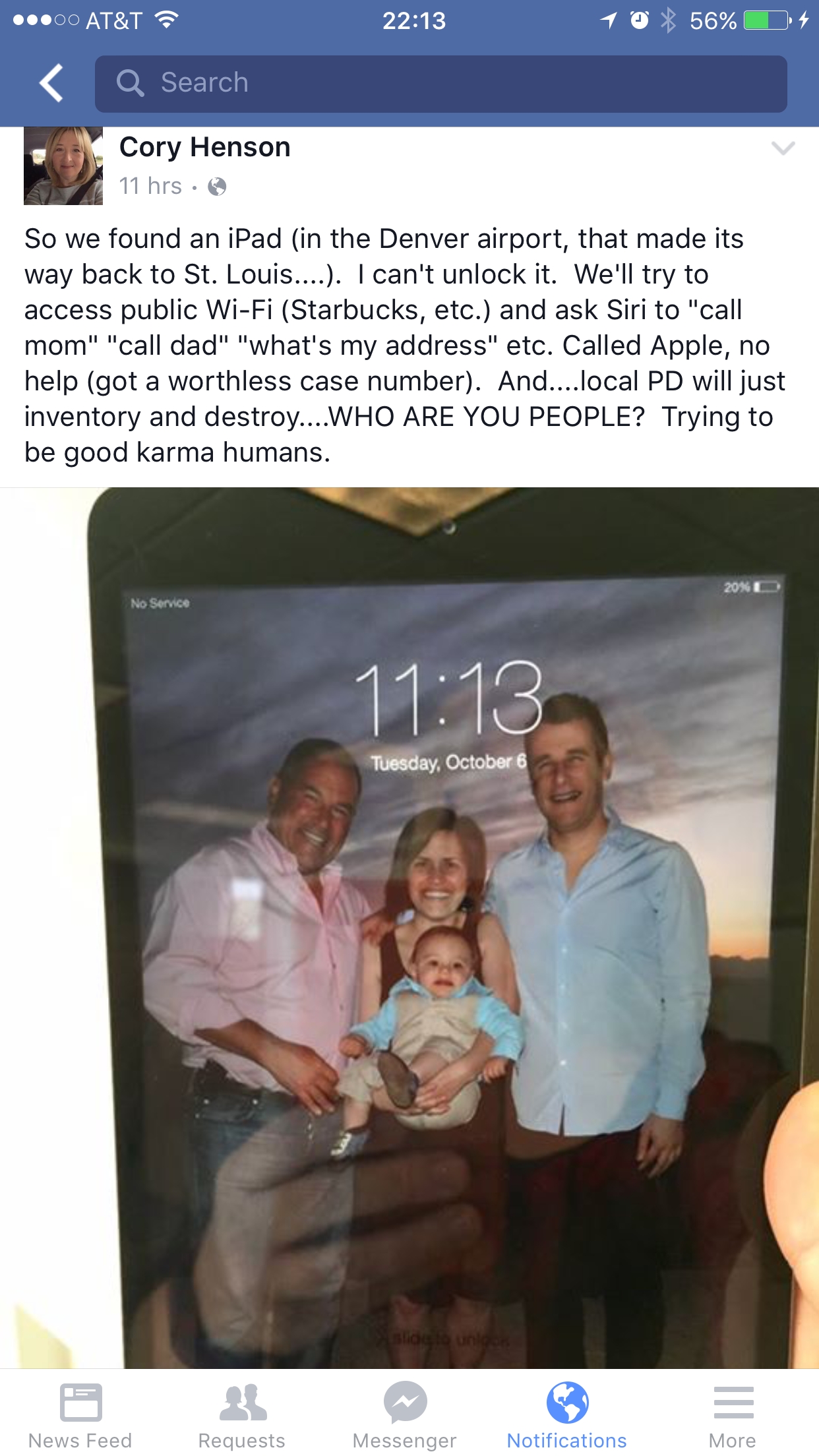
Meanwhile, this just popped up on my FaceBook timeline, shared by one of my Pepperdine MBA classmates:

File Oct 06, 22 26 48 small

There have been a few of these over the last couple of years, usually with a found camera, phone, tablet, or some other electronic device. I have no doubt that a large percentage of electronic devices found by strangers, especially if they don’t require some sophisticated hacking to break into, are simply kept by the finder.

But increasingly we’re seeing people use the internet and social media to try to match the owners with their devices. This is no doubt because so many normal and decent people have figured out how much of their personal lives (data, pictures, video, and so on) are stored inside these magical devices. Folks are now thinking, “If I lost my [insert electronic device here], I would be totally screwed and pissed off!”

In the pre-internet age, the wallet or purse was the most likely receptacle of large amounts of personal information, but the amount of data held was minuscule compared to even the smallest and simplest of today’s “smart” devices. In addition, if one wanted to get the contents of the wallet or purse back to the owner, there wouldn’t be any huge problem in finding out who they belonged to. Real world river licenses and other forms of ID do not have passwords that include a capital letter, a lower-case letter, a symbol, a number, and the paw print of a rabid ferret.

So with so much more at stake in holding and guarding the details of our lives, of course we now have to be that much more careful about keeping those details private. In the event that one of our electronic devices are lost are stolen, we keep them protected, often with several layers of passwords, or even biometric verification schemes, such as the use of fingerprints. This is fantastic if your device is lost and you never see it again but someone, possibly someone without your welfare in mind, gets it and wants access to that data.

What is a good person to do in order to get this device back to those people when we have no clue about who those people are, where they live, or how to contact them. The police are too busy with crime and other problems, and to the average person this would seem to be a needle in a haystack task.

Until someone had the brilliant flash of insight to realize that if a funny cat video could get viewed by half of the people on the planet, so could a picture and the story of a lost camera or iPad.

None of this was why the internet was invented in developed. (Obviously it was built so that we could watch cat videos and get into horrific, stupid, abusive arguments about stupid crap that doesn’t mean squat!) But it’s a great unintended benefit, a way of letting each of us potentially contact millions of people if needed. Even if it’s just to get someone’s vacation pictures back to them.

Do you recognize these people?


And now the iPad upgrade has crashed and burned. What in hell is an “Error 4016”??


Leave a comment

Filed under Computers

Someone Was Eastbound At 39,000 Feet

IMG_5123 small

Wasn’t me. But I love the picture. I caught the twilight and the silhouettes just right.

I’m up to my ass in alligators, taking a couple of big leaps that only feel like they’re from 39,000 feet. Upgrading the iCritters from iOS 8.2 to iOS 9.02. Then I’m going to upgrade my two primary desktop systems and laptop to Windows 10. Of course, it’s not that simple since I’m paranoid experienced enough to be making full backups of everything first, and the Win desktop systems all have multiple hard drives with multiple terabytes each, so it’s a slow process.

Thank goodness that 6Tb drives are now down to $199!

4 Comments

Filed under Computers, Flying, Photography, Travel